E7 Atlas

Unofficial fan tools for Epic Seven

Drafts and gear,
made stronger with data.

E7 Atlas collects tools for Epic Seven players in one place. Both tools are free and run in your browser.

What RTA7PICKS does

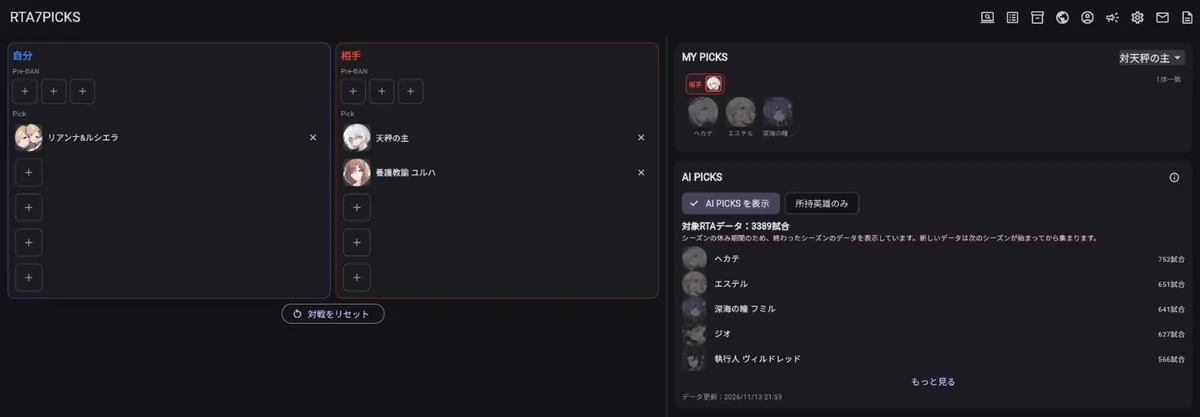
RTA7PICKS shows which heroes to pick next during a World Arena draft (pre-bans and picks). Enter the pre-bans and picks of both sides, and two kinds of suggestions appear.

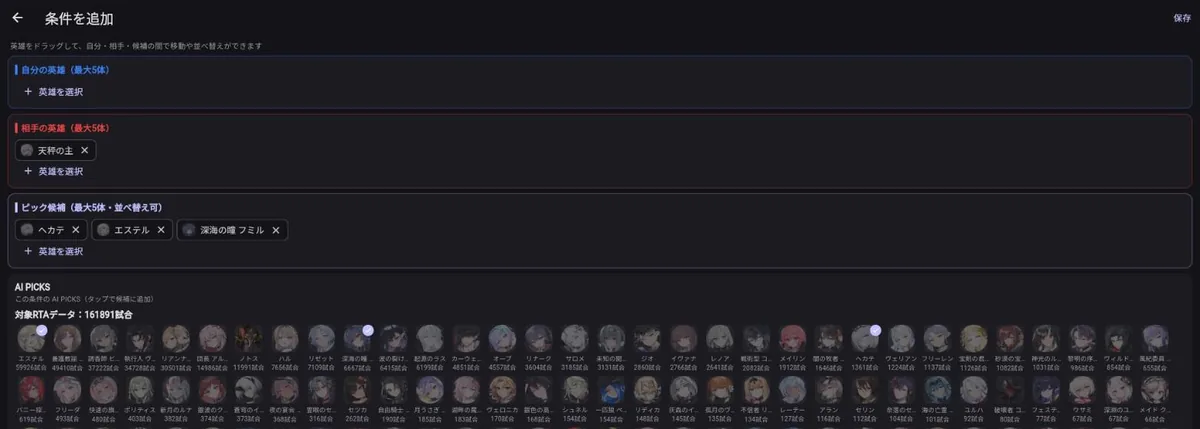
The RTA7PICKS draft screen with both sides' picks on the left and MY PICKS and AI PICKS suggestions on the right
The draft screen. Enter both sides' picks on the left, and MY PICKS (picks matching your rules) and AI PICKS (picks from real match data) appear on the right. The screen is shown in Japanese; English is available too.

AI PICKS

Suggestions built from real RTA matches played by top-ranked players (Champion and above). Among the matches that were won from the same draft situation as yours (both sides, in any order), it shows the hero the winner picked next, together with the number of matches.

Each season covers hundreds of thousands of matches. You can limit the results to the heroes you own. Instead of made-up scores or win rates, it only shows how many matches a hero was actually picked in, so the meaning is easy to understand.

MY PICK LIST

Register your own plans as rules, such as "if the opponent picks this hero, I pick that one". During the draft, only the picks that match your rules are shown.

You can publish and share your lists, or copy lists that other players have published and adjust them for yourself.

Screen recognition

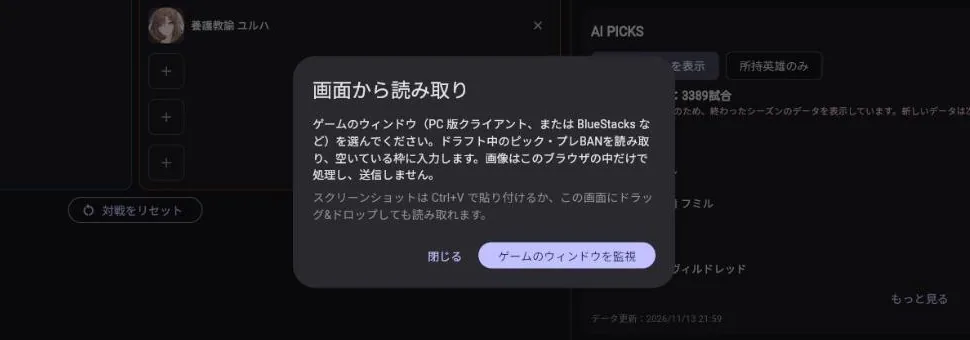
It reads the draft screen of the game and fills in both sides' picks and pre-bans automatically. On a PC, just choose the window of the PC client or an emulator such as BlueStacks. You can also paste a screenshot to read it.

Images are processed only inside your browser or device and are never sent to our servers.
Creating a rule in MY PICK LIST
Creating a MY PICK LIST rule: register "if the opponent picks this hero, consider these". AI PICKS for the same situation are shown below for reference.
Starting screen recognition
Screen recognition: choose the game window, and picks and pre-bans are filled in automatically during the draft.

Other features

Open RTA7PICKS

What E7 Builder does

E7 Builder imports your Epic Seven gear and heroes from the game, lists them, and finds the best gear combination for each hero. It checks millions of combinations in your browser to find ones that match your sets, main stats and target stats.

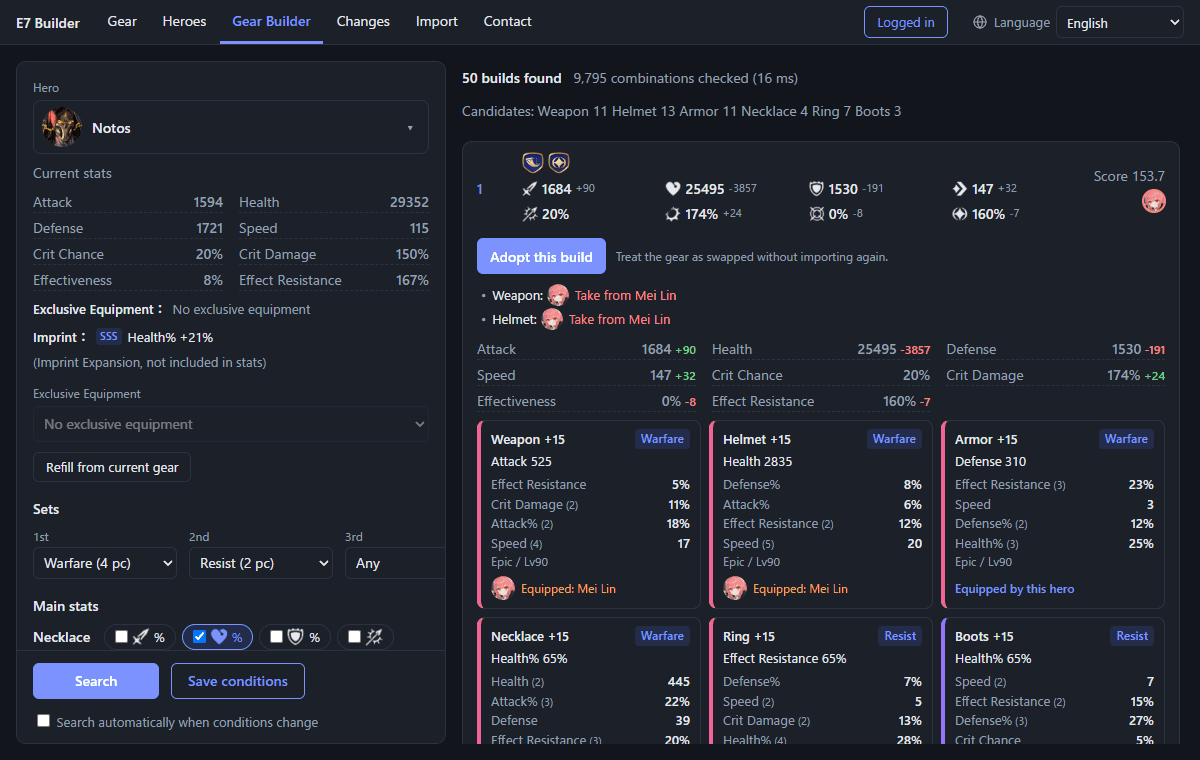
The E7 Builder Gear Builder screen with conditions on the left and gear combinations found on the right
Gear Builder. Set sets, main stats and target stats on the left, and matching combinations appear on the right, sorted by score. Gear taken from other heroes is shown too.

Gear

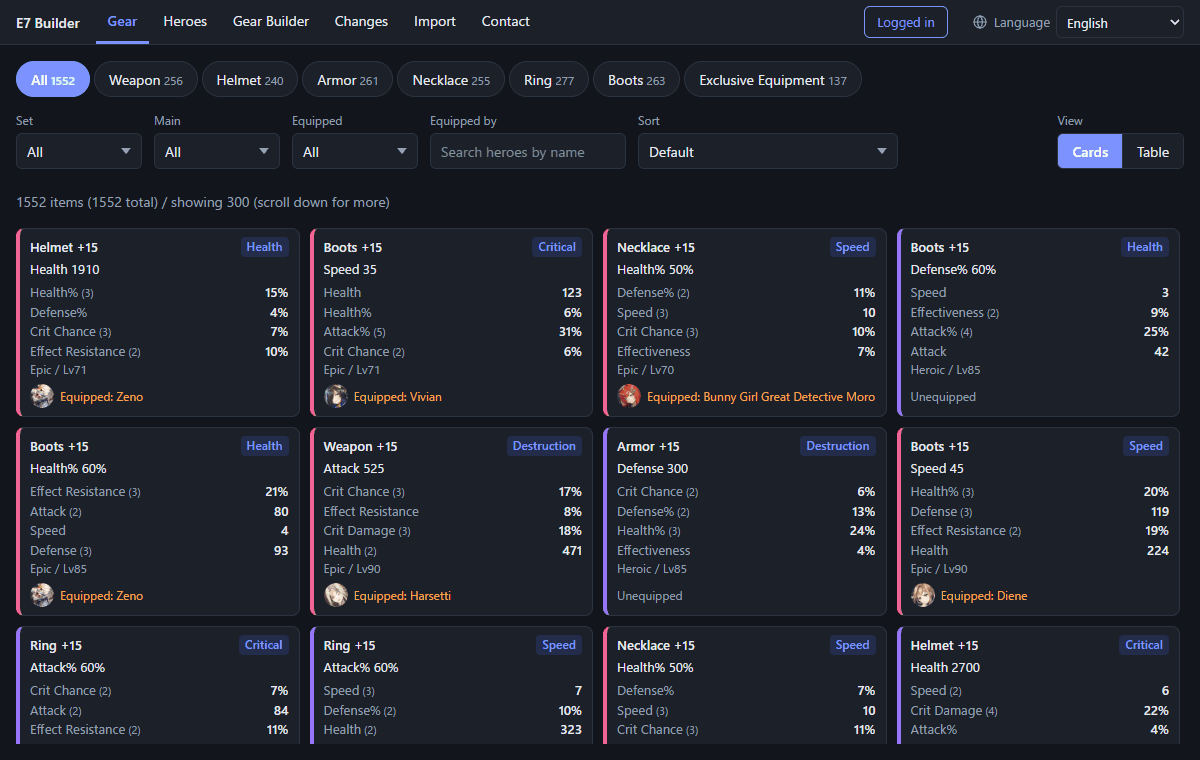
Filter your gear by slot, set, main stat and the hero wearing it, and sort by substat values.

Heroes

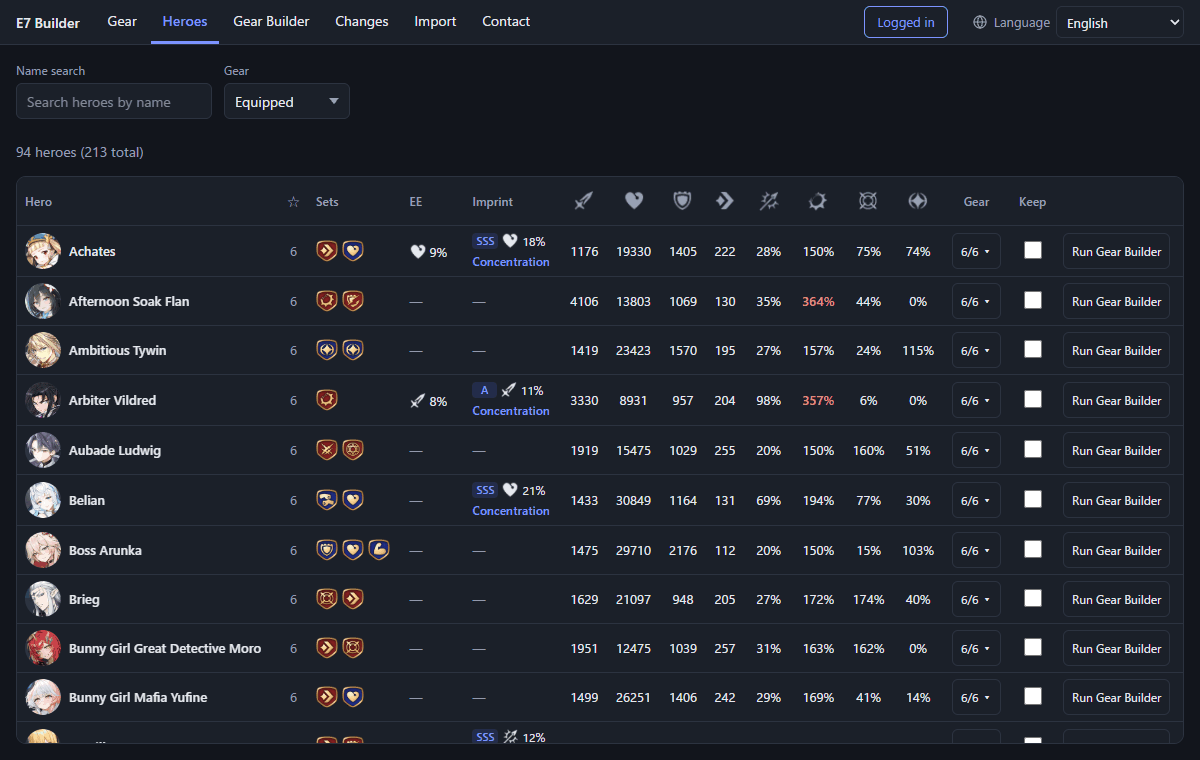
Compare each hero’s current gear, sets, Exclusive Equipment, imprint and final stats in one table.

Gear Builder

Set the sets, main stats, and the minimum, maximum and priority of each stat to find matching combinations. If nothing is found, it tells you which condition can’t be met.

Changes

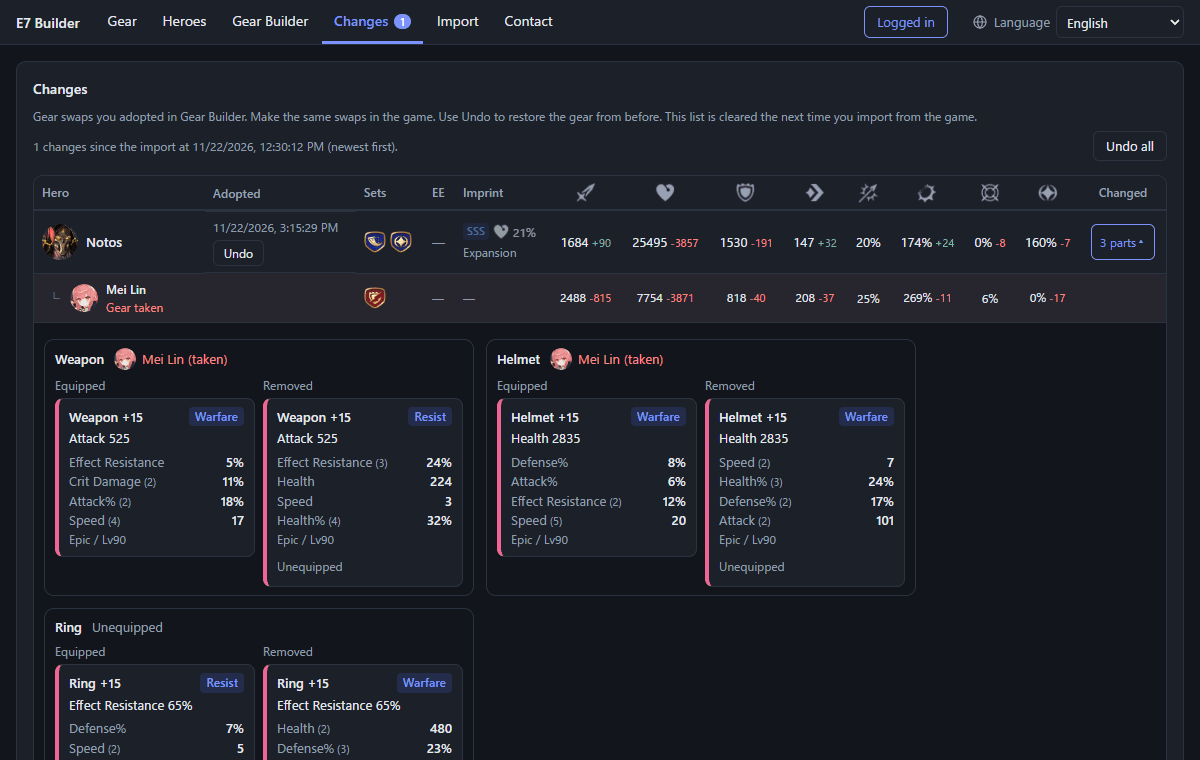
See the gear swaps you adopted, which hero the gear was taken from and how stats change, so you can make the same swaps in the game.

The Gear screen
Gear. Filter by slot, set, main stat and the hero wearing it.
The Heroes screen
Heroes. Compare sets, Exclusive Equipment, imprints and final stats side by side. Values past their cap are shown in red.
The Changes screen
Changes. Check the swaps you adopted and how the stats of heroes who lost gear change.

Key points

  • Import: On a Windows PC, use the import tool (E7BuilderCapture.exe) to import your gear and heroes from the game. Setup steps, including Npcap, are on the E7 Builder about page.
  • Phone: After importing on a PC and logging in, you can use Gear, Heroes and Gear Builder on your phone too.
  • Price: Free to use (supported by ads).

Open E7 Builder

How to use RTA7PICKS

  1. Open the web version

    Open rta7picks.e7atlas.com in your browser. The first screen is the draft screen.

  2. Enter pre-bans and picks

    Tap the slots for "You" and "Opponent" and choose heroes. Add each pick as the draft goes on in the game. With screen recognition, this happens automatically.

  3. Check the suggestions

    AI PICKS on the right lists the heroes most often picked in the same situation, sorted by number of matches. If you choose a MY PICK LIST, picks that match your rules appear too. Tap a suggestion to add it to your picks.

  4. Next match

    Use "Reset match" to clear the slots and start the next draft.

Using screen recognition

  • PC: Open the web version in Chrome, Edge or Firefox, press the "Read from screen" button, choose "Watch the game window", and select the game window. When the draft screen appears, empty slots are filled in automatically.
  • Android / iPhone: Available in the mobile apps. A small floating window over the game shows MY PICKS and AI PICKS (the apps are being prepared for release).

About the RTA7PICKS data

The match data behind AI PICKS comes from the World Arena records that the game publishes officially, collected for top-ranked players. The official data is updated once a day, so the suggestions are based on matches up to the previous day.

Right after a new season starts there are few matches, so data from the previous season is included for a while. Between seasons there are no new matches, so the data from the season that just ended is shown.

FAQ

Is it free?

Yes, every feature is free. The service is supported by ads.

Do I need to sign up or log in?

No. Without logging in, you can use MY PICK LIST and owned heroes on your device. Logging in lets you sync data between the web version and the apps, and publish your lists.

Is this an official tool?

No. E7 Atlas, RTA7PICKS and E7 Builder are unofficial fan tools made by a player. They are not affiliated with or endorsed by Smilegate or STOVE.

Does RTA7PICKS screen recognition send images anywhere?

No. Screen recognition runs only inside your browser or device.

AI PICKS suggests heroes I don't own.

Register your heroes under "Owned heroes" in the menu at the top, then turn on "Owned only" in AI PICKS.

No suggestions appear at all.

AI PICKS only counts matches with exactly the same draft situation. For rare combinations there may be no such matches yet.

Found a bug or have a request?

For RTA7PICKS, use "Contact us" in the web version or the app, or email [email protected]. For E7 Builder, use its contact screen or email [email protected].

About E7 Atlas

E7 Atlas is a site for gathering tools and information that make Epic Seven more fun, all in one place. Besides RTA7PICKS for RTA drafts and E7 Builder for gear, more tools and guides for players will be added over time.